Published September 1 2026
If it feels like Microsoft AI has been moving particularly quickly lately, you’re not imagining it. From product announcements and new Copilots to new models, agents and even logo changes, Microsoft has been moving at a pace that can be hard to keep up with.
Since the beginning of May alone, Microsoft has announced at least 15 significant updates across its AI at Work roadmap, including Copilot Cowork, Microsoft Scout, new Work IQ capabilities, specialised agents, AI-powered workflows and an expanding choice of models.
Keeping up with every announcement could almost be a full-time job. Believe me, I know! But for most people, knowing the name of every new agent, feature or capability probably isn’t all that useful. What really matters is what all of this starts to change in your actual working day.
A year ago, a lot of our conversations about Copilot were still focused on individual tasks. Can it draft this email? Summarise that meeting? And those use cases are still important, and still very much part of the day-to-day. But what is changing is the kind of work AI can take on, from staying with a piece of work for longer to handling multiple steps, carrying context and applying more specialised knowledge.
So, we’ve pulled out five of the biggest shifts we’re seeing across Microsoft’s latest AI updates, what they could actually change in your day-to-day, and where you can start putting them into practice. Happy reading 🙂
1. You will start to give AI bigger pieces of work with tools like Copilot Cowork
Copilot Cowork is one of the clearest examples of how Microsoft is changing the role of Copilot. Now generally available, it is designed to take on longer, multi-step pieces of work rather than helping with one task at a time.
For the past few years, most of us have learnt to work with Copilot for one task at a time. But Copilot Cowork starts to change that relationship and pattern of thinking. So instead of breaking a piece of work into ten separate prompts, you can give Cowork an outcome you want, the context it needs, and some guidance on what good looks like, then let it work through more of the steps itself.
And because we like to drink our own champagne, our teams have been busy testing, trying and experimenting with Cowork to see where it can create the most value. Even in our marketing team, we’re already seeing some pretty impressive results. Recently, we used Cowork to migrate and shorten 36 customer stories into our new PowerPoint one-pager template in about 15 minutes.
For me, that is one of the clearest signs of where things are heading. We’ll still need to brief AI well, give it the right context and check what comes back, but we won’t necessarily need to sit beside it directing every individual step.
Where you can start with Cowork: Think about a piece of work you do regularly that involves several steps. Instead of asking AI to help with each task separately, start with the outcome you need, give it the right context and see how much of the journey it can help you complete. To get the most out of Cowork, I also recommend utilising the Prompt Coach within Copilot to build out a really clear instruction.
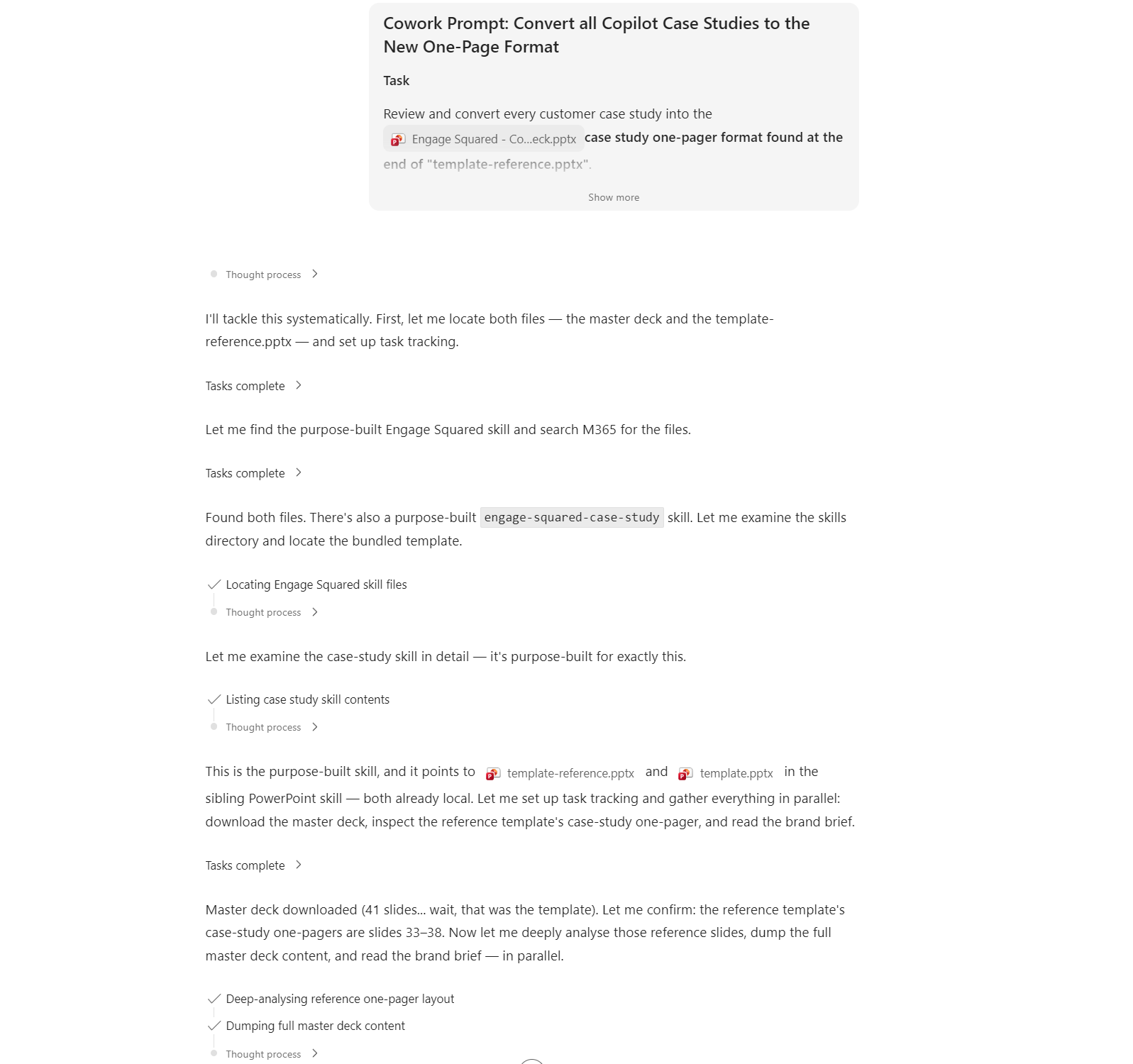
Example of the reasoning steps Copilot Cowork will run through when executing a task
2. You’ll spend less time giving AI all the context with Work IQ
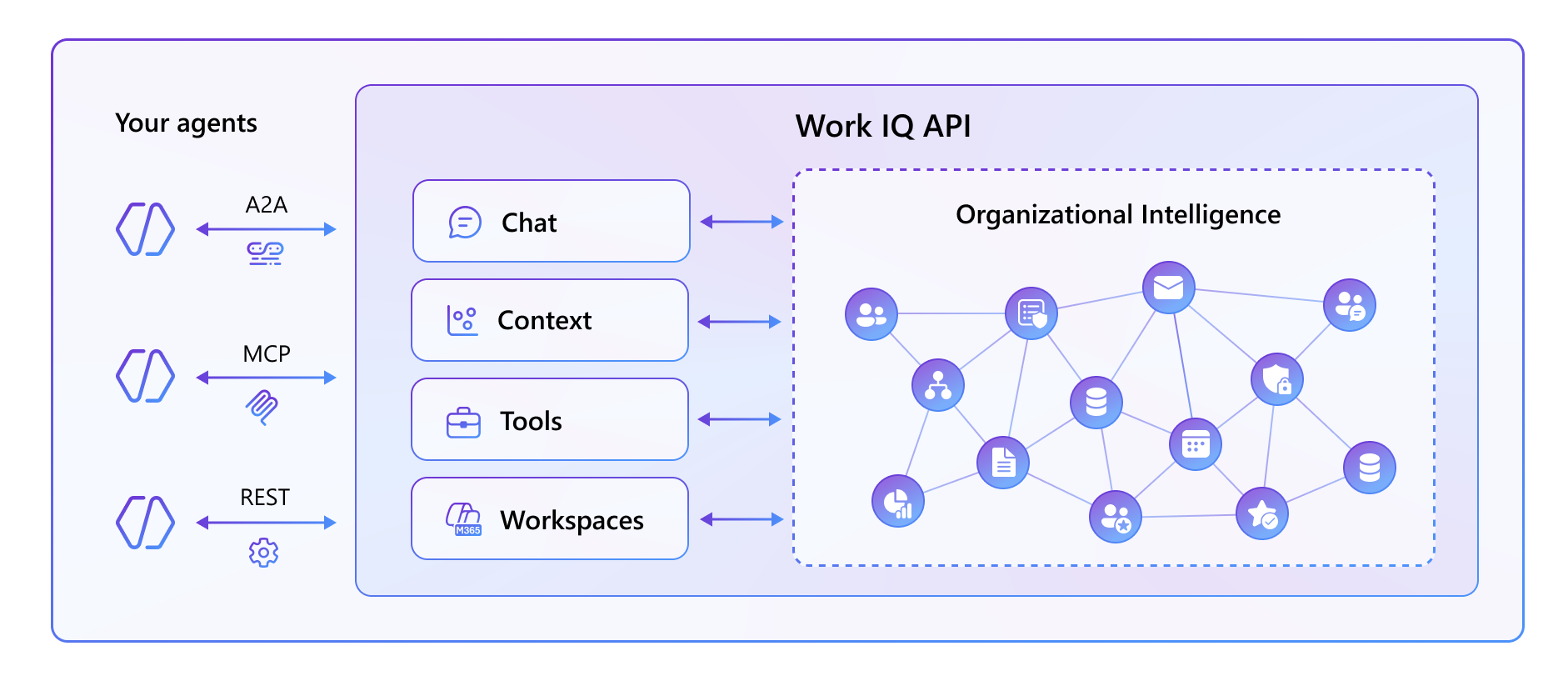
One of the bigger updates behind Microsoft’s latest AI push is Work IQ, and more recently, Microsoft opening Work IQ up through APIs so that agents can access and reason over that same organisational context too. You may have already noticed some of this happening. I know I have! When I’m working with Copilot, it often understands that I work in marketing and that the output I need will look different to something being prepared for one of our consultants or an executive. That little bit of context can make a big difference to how useful the first response is.
And this is where the extensibility piece gets really exciting. We are already starting to explore and experiment with what this could look like for our clients. That same understanding can increasingly sit behind the agents your organisation builds, giving them richer Microsoft 365 context without having to stitch together every piece of information first.
That could mean a project agent that helps catch you up after a few days away, a customer agent that pulls together recent conversations and actions, or an internal agent that can work with the people, files and meetings relevant to what you’re trying to get done.
What this opens up: Agents that have a much better understanding of the work happening around you, with less time spent finding, feeding and explaining the context they need to be useful.
3. Scout is the beginning of the autopilot era
Microsoft Scout is one of the newer additions to the roadmap, and this one does need some groundwork before you can start using it. It is currently in Frontier preview, so organisations need to enable access and work through the relevant setup and governance first. Once you have done that, though, Scout starts to show what a much more active kind of AI could look like.
Scout is an autonomous agent that can work across your Microsoft 365 data, files, browser and desktop environment. It can create and edit documents, interact with web applications, work with Outlook, Teams and SharePoint, and even run scheduled or triggered tasks in the background. It can also delegate more complex work to specialised sub-agents.
That means the day-to-day possibilities are much broader than reminders and follow-ups. For example, you could ask Scout to work through a task across several systems, prepare or update files, gather information from different places, or keep something running while you move on to other work.
For me, Scout feels like the beginning of an autopilot era for workplace AI. I would expect we will see more experiences like this emerge, where AI is not waiting for you to prompt every step, but can keep working, take action and bring you back in when your approval or judgement is needed.
Where you can start: If your organisation is exploring Scout, think beyond individual tasks. Look for work that moves across multiple systems, involves repeated checking or action, or currently depends on someone manually keeping everything moving.
4. Knowing what AI tool to use, and when, will become more important than ever
Microsoft has been moving quickly on choice, and we are a little spoiled for it! We now have different models, first-party agents, specialised agents, Cowork, Researcher, Copilot Studio and AI built directly into apps like PowerPoint. The tricky part is that a lot of them can probably do the same task. The difference is in how they do it, the reasoning steps they take, the quality of the result, how much context they can carry and how much effort they need from you along the way.
Even within Copilot, Claude and OpenAI models can approach the same piece of work quite differently. One might give you the stronger answer straight away, while another might need more steering. The same goes for deciding whether something belongs in Researcher, a first-party agent, a workflow or Cowork.
And once Cowork is in the mix, there is another question to ask: is this task worth using your allocated credits on? Just because Cowork can do something does not mean it is always the best place to do it.
So I think one of the biggest skills in this next phase will be building that what tool, when judgement. Not simply knowing what each option can do, but learning which one gives you the best result for the work in front of you.
What you can test: Take the same piece of work and try it across a couple of models or AI experiences. Compare the result, the reasoning, how much steering it needed and, where relevant, the credit cost. That is how you start building a clearer sense of what belongs where.
5. More of the work will happen in the background
One of the more practical Copilot Studio updates is the new workflow builder experience, which makes it easier to bring workflows, agents, actions and decision points together in one place. We know so much of the day-to-day can still be focusing on the ‘work’ around the work. Like passing something to the next person, checking whether information is complete or simply chasing an approval. The new Copilot Studio experience makes it easier for organisations to design processes where those structured steps can keep moving, while agents can step in where something needs a bit more context or reasoning.
Take customer onboarding for example. Information could be gathered, checked and routed, documents created, approvals triggered and people notified, with a person brought back in when a decision or judgement call is actually needed.
For you, that could mean fewer little handoffs to remember and fewer processes that rely on someone manually pushing them along.
Where you can start: You do not need to start by building anything yourself right away, but really start looking at the processes that create the most friction in your or your teams day-to-day. Where are you constantly handing work over, chasing the next step or doing admin simply to keep something moving? Those are the places worth exploring with your internal teams or a Microsoft partner like Engage Squared.
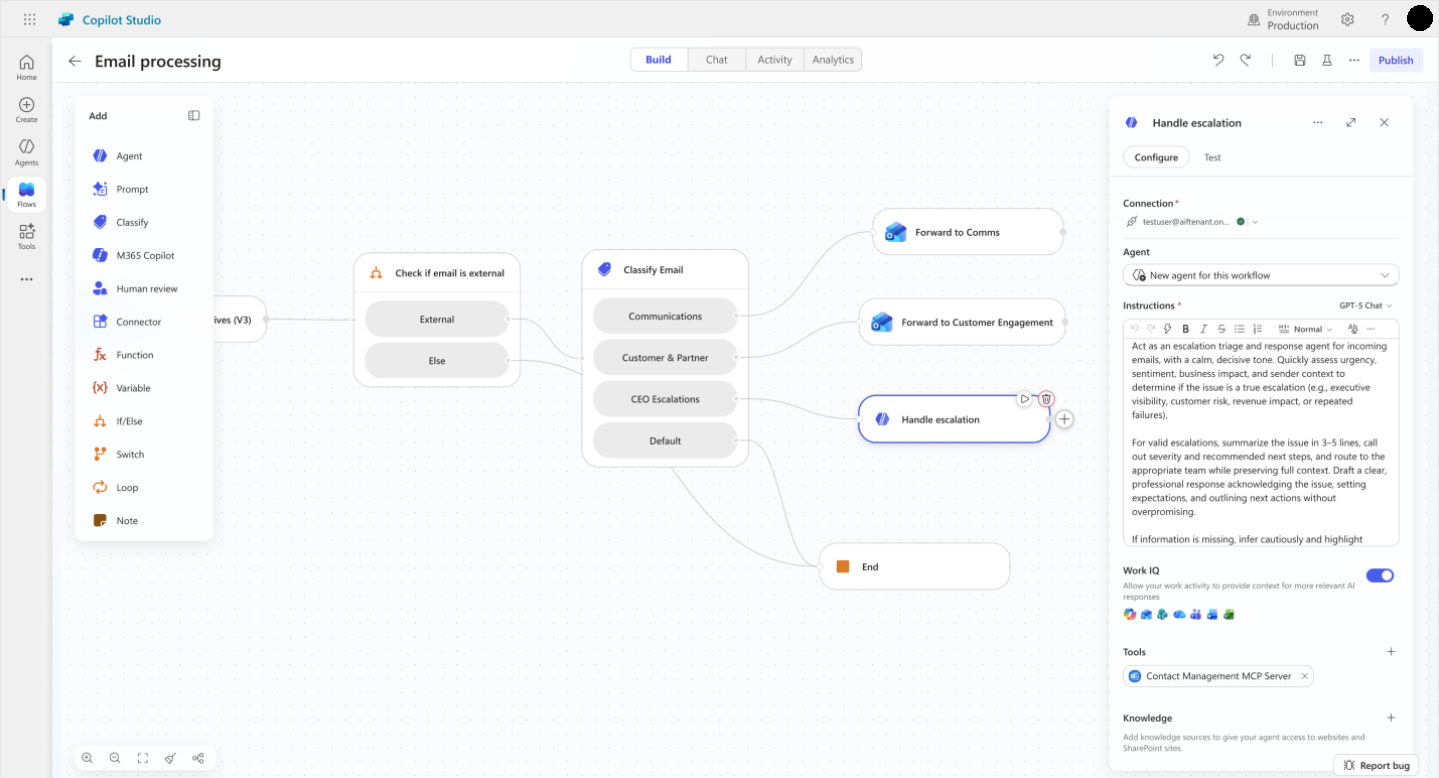
Workflow builder in the new Copilot Studio experience
Ready to get started?
Keeping up with the technology is one thing, but working out what is actually useful for your people, where to start, and how to scale it well is another. At Engage Squared, we help organisations move through that whole journey. That might mean starting small with a Copilot pilot, helping your teams build confidence around what tool, what model and when, or improving adoption so people are getting more than the basics from the licences you already have.
From there, we can help you identify the use cases worth pursuing, prepare your data and governance foundations, design and build Copilot agents and workflows, and work out where experiences like Cowork, Scout and Copilot Studio could genuinely add value.
The right starting point will look different for every organisation. The important thing is starting with the work your people are actually trying to get done, then choosing the technology that makes sense around it.
Ready to get started? Talk to our team about where Microsoft AI could make the biggest difference in your day-to-day.
Get in touch