From Pilot to Productivity: Scaling Microsoft 365 Copilot Across a Leading Healthcare Provider
Our client is a leading healthcare organisation that delivers high-quality care to millions of people each year through a network of hospitals, clinics, and community services across multiple regions.
Client
Withheld
Service
Microsoft 365 Copilot
Organisation size
35,000
Industry
Healthcare
Context
Our client is one of Australia’s leading private healthcare providers, known for its innovation and dedication to quality patient care.
As part of a multi-year digital transformation, the organisation has invested heavily in technology and AI to modernise operations, support clinical outcomes, and improve experiences for both patients and staff. These investments have reduced administrative load, supported faster decision-making, and laid the groundwork for a more connected healthcare environment.
With core systems established and early AI capability introduced through an initial rollout of 30 Microsoft 365 Copilot licences, the focus shifted to scale. The aim was to increase productivity and give staff back valuable time for patient-focused work.
Engage Squared was engaged to support the rollout of 400 additional Copilot licences and deliver an adoption program designed to embed Copilot into everyday work.
Challenge
The journey to adopting Microsoft 365 Copilot wasn’t without its challenges. Across the organisation, people had different levels of comfort and familiarity with digital tools and AI. Some were keen to explore new ways of working, while others were understandably more cautious about introducing AI into their day-to-day roles.
One of the main hurdles was that many employees still saved files to shared drives, which limited Copilot’s ability to find and work with content stored in the cloud.
As with any AI rollout, there were also valid questions around security and privacy. Drawing on experience from hundreds of Copilot projects, Engage Squared designed an approach that met our client’s people where they were, building confidence, addressing concerns, and creating a safe, supportive environment for every team to get started.
Solution
To help our client realise the full value of Microsoft 365 Copilot, we focused on practical, hands-on enablement, delivered in real time and grounded in everyday tasks. Our Adoption & Change Management team led a collaborative program tailored to the organisation’s culture, ways of working, and transformation goals.
Technical readiness
With strong digital foundations already in place, we recommended a top-down licensing approach, starting with Executive Assistants supporting senior leaders. This ensured early focus on high-value, practical use cases. The client also built momentum by hosting a digital launch event, inviting staff to opt in for licenses, generating genuine curiosity and enthusiasm from the start.
Communicating with clarity and authenticity
From the outset, we addressed questions around security, privacy, and how Copilot actually works. Capabilities were explained clearly, with a clear line between what was available now and what was planned for later. This helped set expectations and build trust.
Learning through experience
Training was designed around real work:
- Live sessions showed how Copilot could support everyday tasks like meeting summaries, document edits, and email drafting
- Open workshops gave people time to try Copilot on their own work, with support on hand
- Tip sheets captured simple prompting guidance for day-to-day reference
- Train-the-Trainer sessions helped internal champions support their teams
Follow-up focus groups with Clinical Leadership, Executive Assistants, Corporate Affairs, and Finance provided insight into how Copilot was being used in practice and where it delivered the most value.
The high-impact use cases identified for Copilot
- Executive summaries and meeting minutes: Faster, more accurate recaps and action items.
- Standardised reporting: Quick summarisation of financial and strategic reports in Word and Excel.
- Effective communications: Streamlined drafting of sensitive messages in Outlook, reducing admin time.
- Document refinement: Improved clarity and consistency across memos, governance papers, and policy updates.
A detailed post-project report and recommendations roadmap provided clear evidence of Copilot’s value. Adoption was tracked closely against goals, validating real-time savings, improvements in task quality, and staff satisfaction. The organisation’s leadership gained actionable insights for scaling adoption and planning future enhancements, crucial for their continued digital transformation.
Results
The focus of this project was simple: Provide employees with the confidence, skills, and support to use Copilot in ways that truly helped in their day-to-day work. And it worked. From saving time and simplifying tasks to building confidence and unlocking real, role-based value, Copilot quickly became a trusted part of the workday. In fact, every single user said they wouldn’t want to give it up.
- 100% would recommend Copilot to colleagues
- 100% did not want to lose access
- 90% average satisfaction
- 86% felt confident using Copilot day to day
Adoption and engagement
Overall, 88% of users actively adopted Copilot, which is above Microsoft’s benchmark of 75% within 4–6 months. Users also averaged 42 Copilot actions per active user, which signals regular use, not just one-off tests. Copilot usage was highest in:
- Teams (63%)
- Outlook (63%)
- Word (46%)
Time saved and return
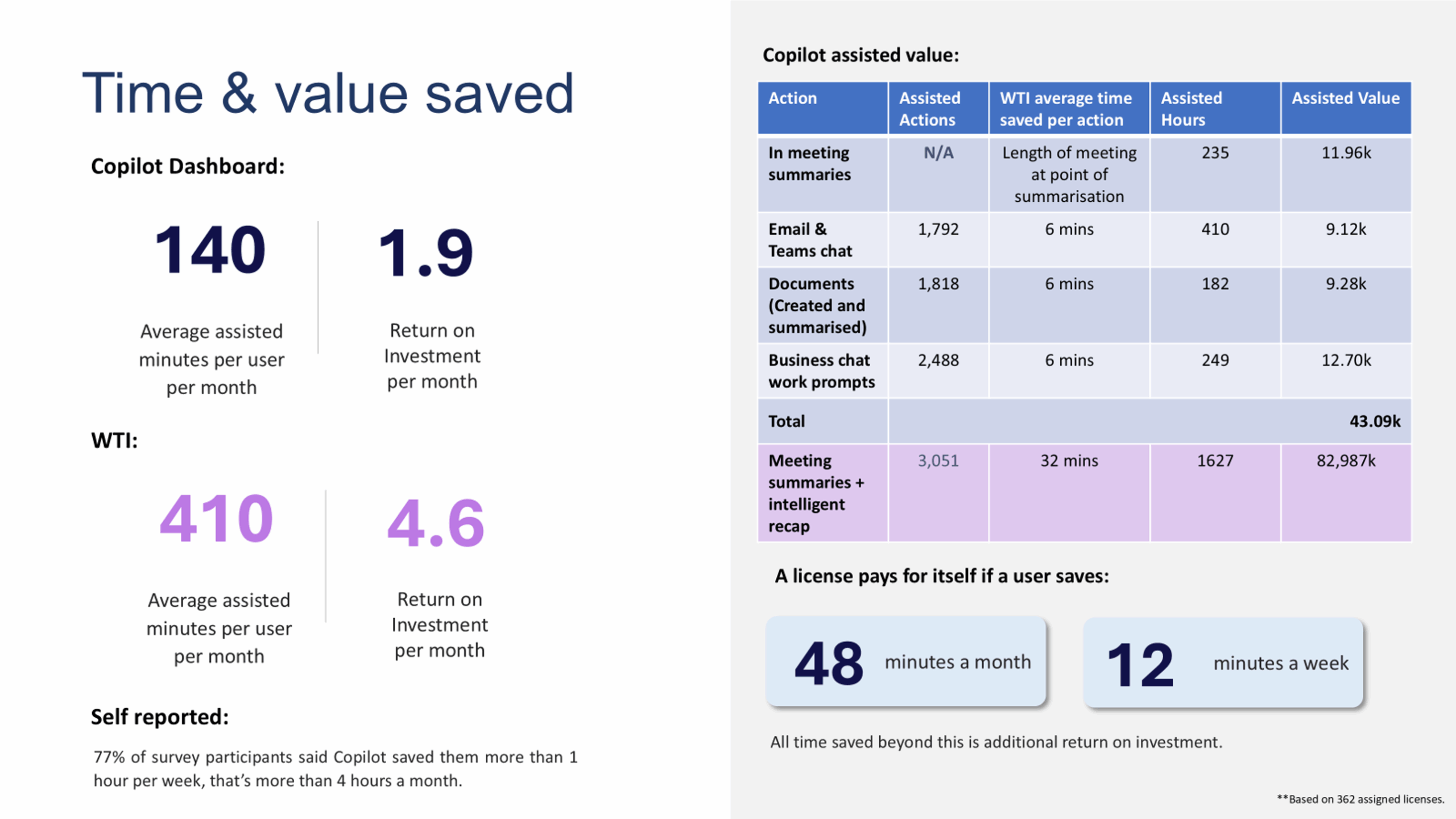
A license pays for itself if a user saves just 12 minutes per week, Copilot far exceeded this, proving substantial financial and productivity returns. Users reported time savings that added up quickly, measured in two ways:
- 140 average assisted minutes per user per month (Copilot Dashboard).
- 410 minutes/month average assisted minutes per user (Work Trend Index).
- Overall ROI: 1.9x per month (Copilot dashboard) and 4.6x per month (WTI).
Capability uplift and training impact
The enablement approach also lifted confidence:
- 100% agreed the training was helpful and engaging
- 93% reported increased confidence using AI since the rollout
- 71% reported increased confidence with broader Microsoft 365 tools
Helping our client find meaningful ways to bring Copilot into their workplace was an opportunity we valued deeply. Their thoughtful and innovative approach to AI in healthcare is already making a difference and it’s just the beginning. We’re looking forward to continuing the journey together.