Microsoft dropped a wave of announcements on 9 March 2026, and at the risk of knowing we say this every time… this is a big deal!
Wave 3 represents a huge shift in how Copilot works. The fact that Microsoft has introduced Microsoft 365 E7 – The Frontier Suite, its first new enterprise licensing tier in 11 years, tells you everything you need to know about how significant this wave is. We’re seeing Copilot move further away from being an ‘assistant’ and closer to something that can actually carry work forward end-to-end, inside the tools your people already use every day.
For us, this is exciting on two levels. As a team that works closely with organisations to roll out Copilot, agents and the foundations around them, we can see what this opens up for our clients. But we’re also excited about what it means for us too, as we keep putting these capabilities into practice in our own work.
Here’s our take on what matters, what’s available now, and what’s coming next.
Copilot Cowork
The headline feature, and the one we’re most excited about. Built in close partnership with Anthropic (the team behind Claude) Copilot Cowork brings long-running, multi-step task execution into Microsoft 365 Copilot.
This means Copilot Cowork lets you delegate a whole piece of work with a single prompt. Instead of one output from one prompt, one prompt will be able to build a full sequences of tasks. Analyse data in Excel, build the PowerPoint, draft the team email. Cowork breaks it down into steps, works across your files and tools, and shows its progress as it goes. Users still have full control and will be able to review, steer, or stop it at any point.
Tasks can run for minutes or hours. Everything stays inside Microsoft’s security and governance framework, files are protected and governed from the moment they’re created, and nothing happens without you being able to see it.
Availability: Research preview with a limited set of customers now. Rolling out through the Frontier program in March 2026.
Edit with Copilot (formerly Agent Mode)
Previously called “Agent Mode” in preview, Microsoft dropped the name because it was never really a separate mode, it’s just how Copilot works now.
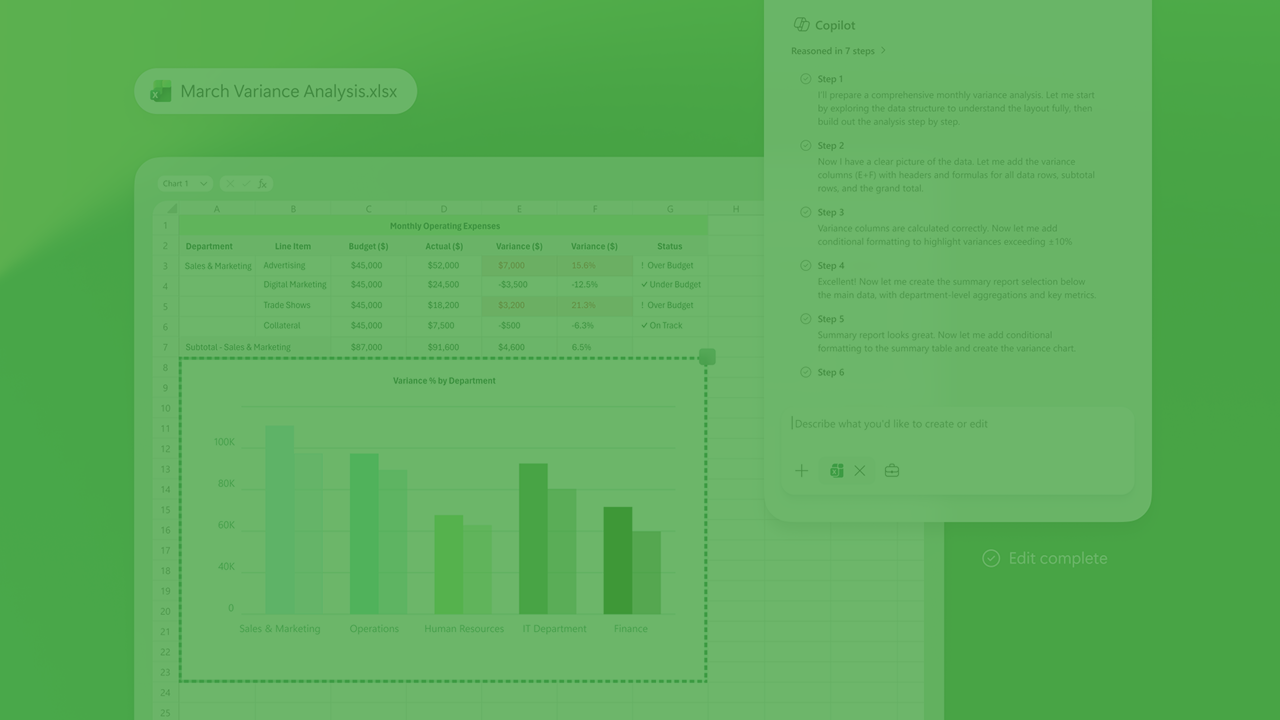
Edit with Copilot works inside Word, Excel, PowerPoint, and Outlook by creating, editing, and refining content inside your actual files. This means no copying and pasting, and no content leaving your governance controls.
- Word – Refines documents into polished drafts
- Excel – Builds real, working formulas
- PowerPoint – Produces slides that match your organisation’s templates, layouts, and brand kits (this one has the marketing tick of approval)
- Outlook – Drafts and refines emails in the compose window
Your existing Microsoft 365 permissions and sensitivity labels are enforced throughout. Files save to OneDrive and SharePoint. Governance, audit, and retention policies apply automatically.
Availability:
- Word + Excel: Generally available now
- PowerPoint + Outlook: Rolling out over the coming months
Agents in Copilot Chat
Copilot Chat is quickly becoming more than a place to ask questions. In Wave 3, Microsoft has turned it into a more useful starting point for real work, giving people a way to create content, take action, and pull the right tools into one place without constantly bouncing between apps.
From chat, your people can create documents, spreadsheets, and presentations, schedule meetings, and draft and send emails all without leaving the chat window or jumping between apps. Wave 3 also brings MCP (Model Context Protocol) support, meaning your external tools like Dynamics 365, Adobe, Figma, Monday.com, Power Apps, can all be surfaced directly inside Copilot Chat.
Availability:
Excel, Word, and PowerPoint Agents in chat: Generally available
Schedule from chat + custom instructions: Available now
Send email from chat: Rolling out over the next few months
Multi-Model Intelligence
Copilot now draws on multiple AI models and applies the right one for the task, without needing to think about it. But, it’s also great for those users who do want control over what model they use.
Wave 3 brings:
- Claude (Anthropic) is now in mainline Copilot Chat via the Frontier program. This model is particularly strong for large documents and complex contexts.
- OpenAI GPT-4 Thinking (with GPT-5.4 Thinking rolling out) is great for deeper reasoning on complex tasks using your enterprise context.
Agent 365
As agent use scales across your organisation, IT and security leaders need a way to govern it without rebuilding infrastructure and Agent 365 will do just that.
Agent 365 gives your IT team one place to observe, secure, and govern every agent across the organisation.
This includes those built internally, through Copilot Studio, or brought in from a third party.
- Every agent gets its own Microsoft Entra ID
- Manage agents the same way you manage users, so using familiar tools and familiar processes
- Integrates with Microsoft Defender, Entra, and Purview
- Connects to the Microsoft Admin Centre for central agent managementAgent 365: Generally available 1 May 2026
Pricing: $15USD per user, per month (or available in E7 as below)
Microsoft 365 E7 – The Frontier Suite
Alongside the Wave 3 announcements, Microsoft also introduced Microsoft 365 E7: The Frontier Suite, its first new enterprise licensing tier in more than a decade. The last time we saw a shift like this was when E5 launched in 2015. E7 arrives on 1 May 2026, and the timing says a lot about where Microsoft believes the next phase of work is heading.
E7 is designed for organisations that want to run Copilot and agents together across the business, not just as individual tools. The goal is to equip employees with AI across everyday work surfaces like email, documents, meetings, spreadsheets and business applications, while giving IT and security teams the governance and visibility needed to manage AI at enterprise scale.
The suite bundles together several core capabilities into a single licence:
- Microsoft 365 Copilot
- Agent 365
- Microsoft Entra Suite
- Microsoft 365 E5 (including advanced Defender, Entra, Intune and Purview capabilities)
In practical terms, that means productivity, identity, security and AI operating together in one environment. As organisations begin scaling agents and AI-assisted work across teams, the governance layer becomes just as important as the tools themselves. E7 is Microsoft’s way of packaging those foundations together.
Pricing: $99USD per user per month
Availability: 1 May 2026
Whether E7 makes sense will depend on where an organisation is in its Copilot journey, but the introduction of a new enterprise tier after 11 years signals how central AI and agents are becoming to the Microsoft 365 platform.
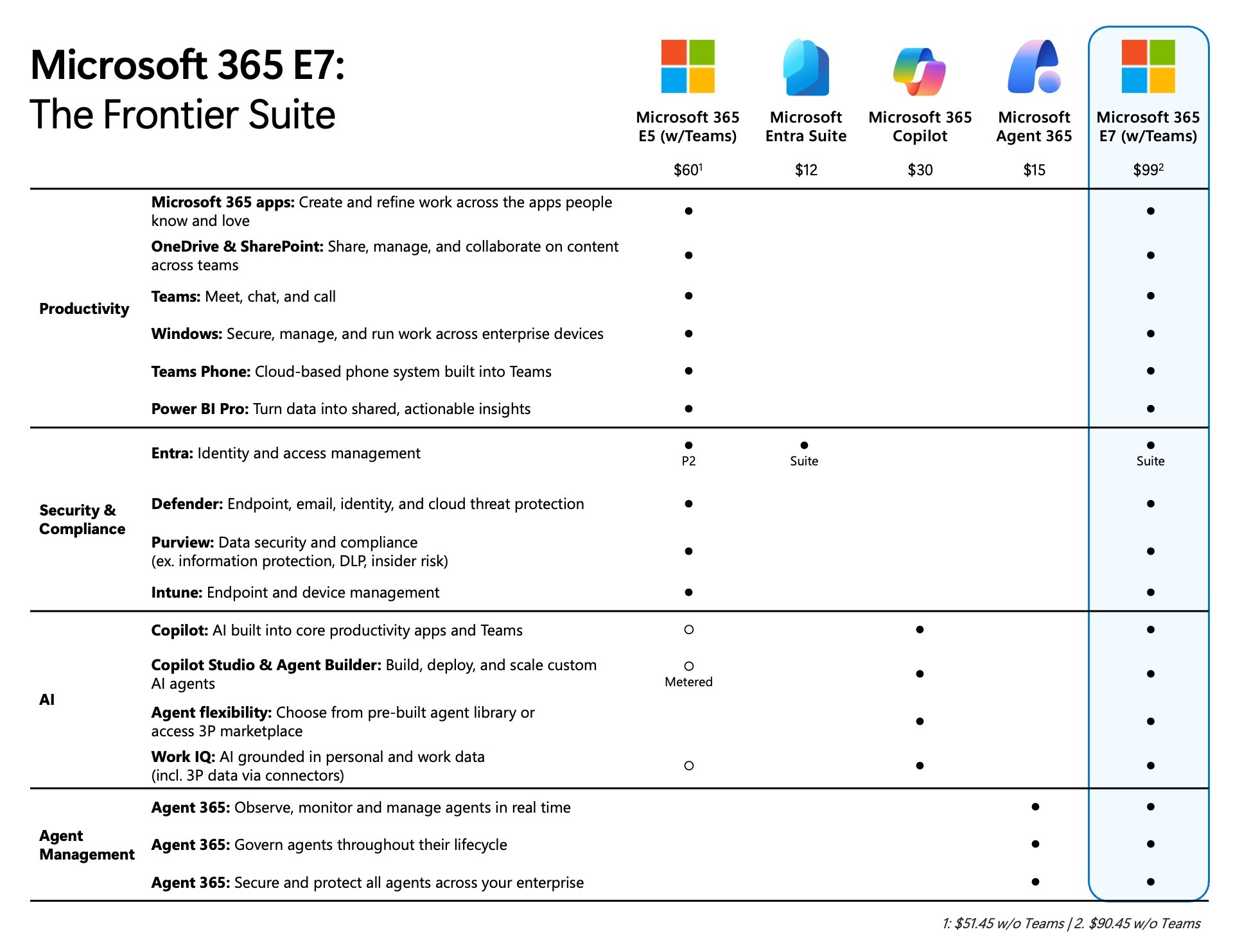
Image credit: Microsoft
Timeline
Wave 3 gives us a much clearer picture of where Microsoft 365 Copilot is heading next. Some of these capabilities are already here, others are starting to roll out, and others are arriving through Frontier and new licensing from 1 May. Taken together, this is a big shift. Copilot is becoming more capable inside the apps people already use, more useful in chat, and more ready for organisations that want to scale agents with the right security, governance and control around them.