
en

Published Tuesday 19th February 2026

Over the past year, our team at Engage Squared has been deep in the day-to-day of building Copilot agents. It’s fast-moving work, and we’re seeing real impact across the organisations we support. But behind the scenes, it’s a whole lot of testing, and refinement to get an agent behaving consistently and delivering the outcome both we and our clients expect.

So we asked our developer, Daria Utianskaia, who’s been living and breathing Copilot Studio, to share what she’s learned from a year of hands-on builds with Copilot agents.

What I learned after a year of building Copilot Agents 

After a year spent building Copilot Studio agents hands-on, you learn things that no documentation, training course, or demo can really prepare you for. These lessons show up when you’re in real delivery and working with real clients, real deadlines, and experiencing the real behaviour of the platforms.

Here’s what I’ve learned from a year of building agents.

1. Plan time for the unexpected

AI is so powerful but not always predictable. You can do everything “right” and still spend time debugging unpredictable errors or behaviour. A real example:

I had an agent that sometimes didn’t trigger when called from a Power Automate flow with no error, no explanation, no warning. Just silence. It can be time consuming, but the only way to solve this sometimes is a manual loop of change > test > a dash of hope & repeat.

If you don’t plan time for these surprises:

  • You can fall behind schedule
  • Your stress spikes
  • And you end up needing to explain behaviour you cannot fully explain

This is why we build significant debugging and buffer time into our projects. It’s essential to navigating all the complexities of a Copilot agent build.

2. AI is not always reliable (and that’s OK if you plan for it) 

If you need a rule followed 100% of the time, don’t rely on the model alone. AI Models can drift, especially when they’re trying to be helpful and complete the task. 

I’ve seen agents: 

  • Ignore instructions because they think they “know better” 
  • Over interpret logic that should have been followed exactly 
  • Produce responses outside given boundaries because it tries to complete the task “fully” 

The way we handle this is, if there is anything sensitive or business-critical must live outside the AI layer in deterministic controls (permissions, validation, workflows, code), and use the agent to guide, summarise, draft, and support decisions, not to enforce hard rules.

3. Retry logic is your friend

This one surprised me through our agent builds. Sometimes an agent just doesn’t fire the first time! There isn’t always a visible cause or identifiable pattern, but when I added retry logic with a few minutes delay, the agent fired on the second or third attempt.

Learn more about inputs and how to do this here.

4. Always recheck the client’s knowledge sources

An agent can only be as useful as the knowledge it can reliably access. When clients provide knowledge sources, always verify: 

  • Is the information correct? 
  • Is the content structured in a way that supports retrieval? 
  • Does it match what the client believes the rules are? 
  • Does it contain ambiguous or conflicting instructions? 
  • Will the infromation answer the questions they want the agent to answer?

In one project, the client said the agent was giving the wrong answers, but the “wrong” behaviour matched the instructions in their own documentation.  A check of the sources saved hours of debugging something that isn’t broken. 


5. Content moderation can break your agent

If your use case includes: 

  • Abuse related language related language 
  • Drugs 
  • Weapons 
  • Personal data 
  • Anything sensitive 

Then expect the default content moderation to block perfectly valid conversations. 

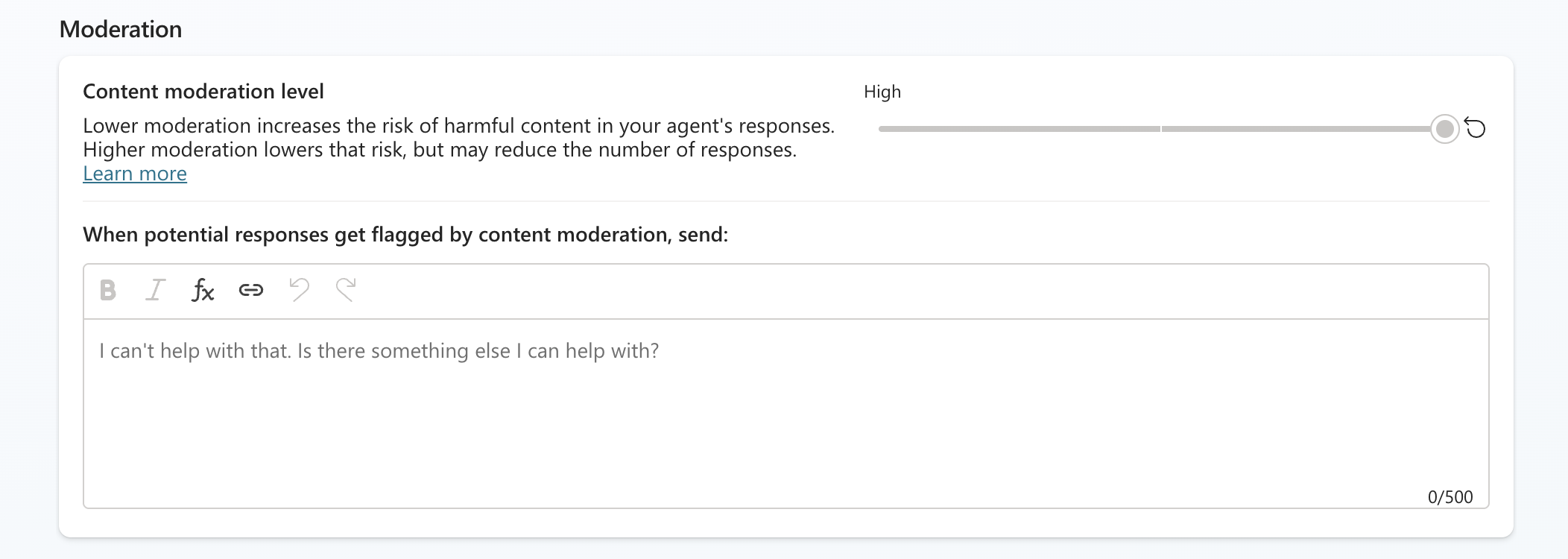
The safest approach in business scenarios dealing with sensitive topics was lowering moderation to the minimum required level so messages wouldn’t be blocked midflow. Otherwise, the agent simply refused to proceed, even though the content was valid for the scenario flow.

Content moderation in Copilot Studio

6. Align expectations early

People come into an agent build with big goals and plenty of ideas, that’s what makes these projects exciting. The key is agreeing early on what we’re delivering now, what comes next, and what “done” looks like. 

Without that shared view, feedback can drift into: 

  • “We expected it to do more.” 
  • “We’re not seeing the value yet.” 
  • “It doesn’t feel production ready.” (Even if it’s a PoC) 

Document it and keep it visible: 

  • Scope (what we’re building) 
  • Constraints (data access, permissions, platforms, policy) 
  • Success measures (how value will be judged) 
  • What the agent will do 
  • What the agent won’t do (and why) 

This keeps delivery smooth, prevents scope creep, and gives everyone clear alignment throughout the agent build. 

7. Know the platform limitations

Agents don’t have the background knowledge people assume they do. Their world is limited to the sources you connect, the file types those sources contain, and how content is structured, and Copilot Studio also has quotas and limits that shape what’s possible. 

Some examples: 

  • Visio can’t be used directly in many setups but exporting to PDF or embedding diagrams in Word usually works. 
  • Large documents may need splitting/chunking to improve retrieval and answer quality. 
  • Message quotas/limits can apply and if they’re hit, users may see a failure notice. 

Be confident when explaining these guardrails and do it at the beginning of the project. It’s the surprises through agent builds that create dissatisfaction, but you can build trust with clear guidance early on. 

8. Teach clients how to prompt 

This is really important, and not optional!  Better prompts = better agent behaviour, every time.

Agents respond best when people explain what they’re trying to achieve and what “good” looks like. A short, vague prompt forces the agent to guess.. which is when you get broad answers, assumptions filling the gaps, or the wrong focus. 

That’s why user prompting guidance needs to be part of every rollout. Teach the people using the agent how to ask for the outcome they want, the context that matters (audience, timeframe, source), and any constraints like tone, length, or format. 

Without context, constraints, or the “why” behind a question, an agent will: 

  • Give general answers 
  • Fill gaps incorrectly 
  • Choose its own interpretation of what matters 

Explaining the basics of prompting early prevents a lot of “the agent gave a weird answer” issues later. 

Final thoughts

Building Copilot agents in real projects teaches you far more than any documentation or demo ever could. The unpredictable behaviour, the challenges with the tooling, the importance of clean knowledge sources, and the need for strong expectation setting all become obvious only when you are hands-on and in the thick of it.

These lessons won’t eliminate every challenge, but they will help you avoid avoidable mistakes, reduce frustration, and stay in control when the platform does something unexpected.  Like

About the author

Daria Utianskaia is a Power Platform developer with an engineering backgroundpassionate about continuous learning, problem-solving and helping people make their day-to-day lives easier.


At Engage Squared, we work alongside organisations to design and build practical Copilot agents that fit the way people actually work. Whether you’re starting with one high-value use case or building an agent roadmap, our focus is on outcomes your teams will actually use.

If you’re exploring Copilot agents, we can support through every step of the agent journey. From early exploration and use case discovery, to business workflow mapping and enabling your team, through to scaling for the enterprise, we can support you with the right approach.

If you’d like to chat about what this could look like in your organisation, get in touch. We’d love to connect.


Ready to get started with Copilot Agents?